Treatment Questions Structure
You can choose whether you want to setup your own questionnaire or use our questionnaire setup.
Use your own questionnaires
If you want to use your own questionnaire setup, please do the following:
- Go to Settings > Clinics
- Click Action menu for a clinic, then choose "Clinic's questionnaires"
- You can add your own questionnaires here
- Go back to Settings > Clinics
- Click Action menu for a clinic, then choose "Setup questionnaires"
- Select a branch, then select a treatment category
- Select treament(s)
- Select master questions, choose "Clinic's questionnaires"
Use our master treatment questions
There are 3 types of questions:
1. Master treatment questions
These questions will always be shown in every treatment.
Master treatment questions will be managed by admin only.
2. Group questions
These questions groups will be shown if the related injection type is selected by the user.
For example: if a patient selected xeomin treatment, she would get a question group that has xeomin injection type.
3. Additional questions
We can add more additional questions to the treatment. This will be specific to 1 treatment only.
To manage additional questions, go to Settings > Clinic > Branch > Treatment category > Treatments > Treatment questions
Please see below figure:
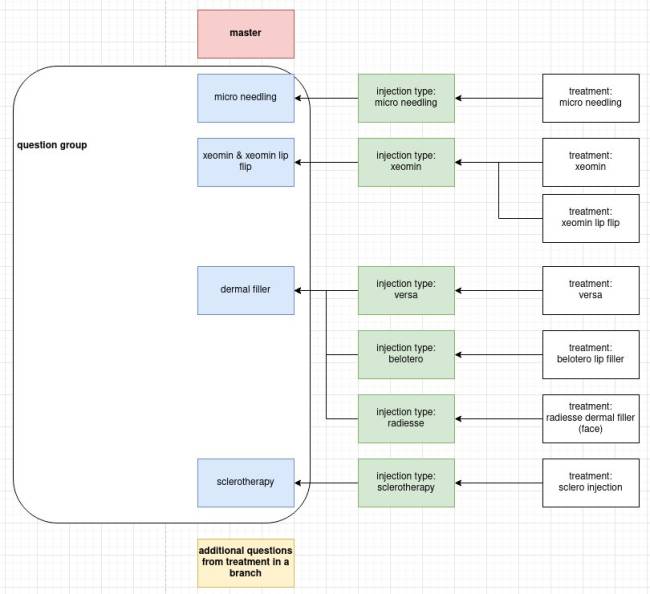
For example from above figure:
If a patient chose xeomin treatment, she would get these questions:
- master questions
- xeomin & xeomin lip flip questions
- additional questions (if any)
If a patient chose xeomin & xeomin lip flip, she would get these questions (no redundant questions):
- master questions
- xeomin & xeomin lip flip questions
- additional questions for xeomin & xeomin lip flip for the chosen branch (if any)
if a patient chose micro needling, she would get these questions:
- master questions
- micro needling questions
- additional questions for micro needling for the chosen branch (if any)
To set your treatment's questionnaire, please do the following:
- Go to Settings > Clinics
- Click Action menu for a clinic, then choose "Setup questionnaires"
- Select a branch, then select a treatment category
- Select treament(s)
- Select master questions, choose "Master Questions"